

Square Face Generator
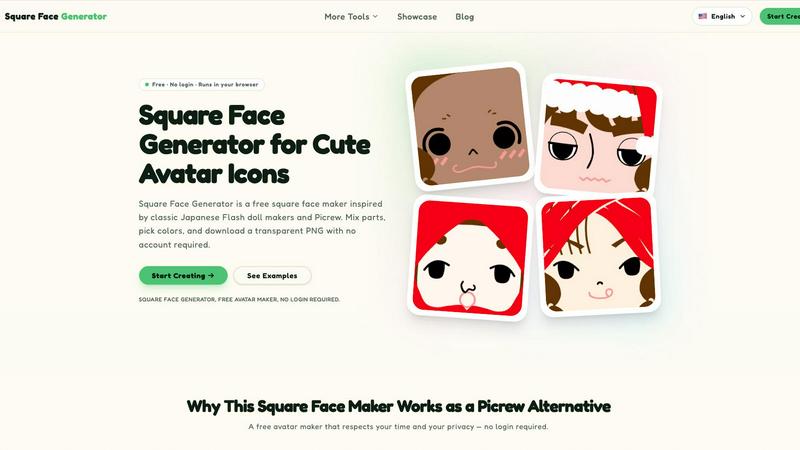
Square Face Generator is a free browser-based tool for creating cute square avatar icons by mixing parts and colors, with instant transparent PNG.
About Square Face Generator
Square Face Generator is a free, browser-based avatar creation tool that specializes in producing charming square-shaped character icons. Inspired by the popular Picrew platform and classic Japanese Flash doll makers, this tool allows users to mix and match over 200 customizable parts across 12 distinct categories to create millions of unique combinations. The categories include skin tones, bangs, side hair, eyes, nose, mouth, eyebrows, eyelashes, blush, glasses, hats, and outfits. Each part can be fine-tuned using an integrated color picker that supports HEX input, giving users precise control over their character's appearance. The entire application runs locally within the user's browser, meaning no data is ever uploaded to external servers or stored on the cloud. This ensures complete privacy and security for all users. The tool is fully responsive and touch-friendly, functioning seamlessly across desktop computers, tablets, and smartphones. No login or account creation is required to use any feature of the Square Face Generator. Users can download their finished avatars as transparent 256x256 pixel PNG files with a single click, making them immediately ready for use on social media profiles, in game development projects, or for any creative endeavor. The tool is ideal for individuals seeking a quick, private, and completely free alternative to other avatar makers that often require accounts, subscriptions, or watermark removal.
Features of Square Face Generator
Complete Privacy and Local Processing
All avatar rendering and processing occurs entirely within the user's browser. No images, selections, or personal data are transmitted to any external server. This means users can create and customize avatars without worrying about data collection, tracking, or privacy breaches. The tool requires no internet connection after the initial page load, ensuring a secure and private creative experience.
Extensive Customization with 200 Plus Parts
Users have access to over 200 individual parts spread across 12 comprehensive categories. These include essential facial features like eyes, nose, and mouth, as well as hair options including bangs and side hair. Accessory categories such as glasses, hats, and outfits allow for complete character styling. Each part can be independently selected and combined, enabling millions of distinct avatar combinations.
Integrated Color Picker with HEX Support
Every customizable part includes a built-in color picker that allows users to precisely adjust colors for skin tones, hair, outfits, and accessories. The tool supports HEX color input, enabling users to match specific brand colors, team colors, or personal preferences with professional accuracy. This feature ensures that avatars can be perfectly coordinated or intentionally contrasted.
One Click Transparent PNG Export
Finished avatars can be exported as transparent 256x256 pixel PNG files with a single click. This standard size is ideal for profile pictures on social media platforms, game avatars, and community icons. The transparent background ensures the avatar integrates seamlessly into any design or platform without requiring additional editing.
Use Cases of Square Face Generator
Social Media Profile Pictures
Users can quickly create unique and personalized profile pictures for platforms like Discord, Twitter, Instagram, and TikTok. The square format and transparent background make these avatars immediately compatible with all major social media profile picture requirements. Users can create multiple avatars to reflect different moods, occasions, or personal brands without needing design skills or software.
Indie Game Development and Prototyping
Game developers can use Square Face Generator to rapidly produce placeholder or final avatar icons for characters in indie games. The tool provides a consistent square format that works well for UI elements, character selection screens, and player profiles. The ability to generate diverse characters quickly helps developers visualize and test character designs during early development stages.
Team and Community Branding
Groups such as gaming guilds, school clubs, or corporate teams can create a unified visual identity by generating avatars using shared color schemes or style guidelines. Each member can maintain individual personality through different face parts while adhering to a common aesthetic. This creates a cohesive look for community profiles, team rosters, or group chat applications.
Creative Projects and Digital Art
Artists, educators, and content creators can use generated avatars for slideshows, posters, stickers, school projects, or digital zines. The tool provides a quick way to produce consistent character art without requiring drawing skills. The transparent PNG format allows these avatars to be easily integrated into larger compositions or printed materials.
Frequently Asked Questions
Is Square Face Generator really free to use?
Yes, Square Face Generator is completely free to use with no hidden costs. All 12 categories and over 200 customizable parts are accessible without payment. There are no paywalls, no watermarks on exported images, and no premium features locked behind subscriptions. Users can create and download unlimited avatars without ever entering payment information.
What size are the exported avatar images?
All exported avatars are 256x256 pixel transparent PNG files. This standard square size is optimized for use as profile pictures on most social media platforms, game avatars, and community icons. The transparent background ensures the avatar can be placed on any colored background without visible edges.
Can I use my generated avatar for commercial purposes?
Yes, you can use avatars created with Square Face Generator for commercial projects. This includes using them in games, marketing materials, product designs, or any other commercial application. There are no restrictions on usage rights for the avatars you create. However, you cannot resell the tool itself or claim ownership of the underlying software.
Does Square Face Generator work on mobile devices?
Yes, the tool is fully responsive and touch-friendly. It works equally well on desktop computers, tablets, and smartphones. All controls are optimized for touch interaction, allowing users to select parts and adjust colors using their device's touchscreen. No app installation is required as the tool runs entirely in the browser.
Explore more in this category:
Similar to Square Face Generator

Nano AI
Create and edit AI images, generate videos, and compare models in one creative workbench.

AppScreen
Design App Store and Google Play screenshots as one panoramic canvas in your browser. Free to start.

ogimagegenerator.dev
Paste a URL and AI designs on-brand Open Graph images from your page's colours, fonts and logo. Free, no sign-up.

Screen Issues
Free Online Screen Test Tool - Instantly diagnose dead pixels, lines, color issues, and flickering. Multiple test modes, no download needed.

FreeVideoGenerator
Free AI video generator: turn text prompts and photos into video clips with Sora 2, Veo 3.1, Wan and more. Free starter credits, no watermark download

Capafy AI
Agent Skills marketplace: discover expert AI agents, run them online, or publish a Skill and earn from every sale.

AIPetGen
AIPetGen turns a photo of your dog, cat, or other pet, or a written description, into a new picture or a short animation.

Chatit Me - Free Random Chat Alternative
Chat with random strangers online for free on ChatIt.me. Enjoy safe, anonymous, and instant 1-on-1 conversations with people worldwide