

Online Keyboard Shortcuts
OnlineShortcuts.com is your definitive guide to mastering essential keyboard shortcuts across Windows, macOS, and Linux for faster, more efficient.
About Online Keyboard Shortcuts
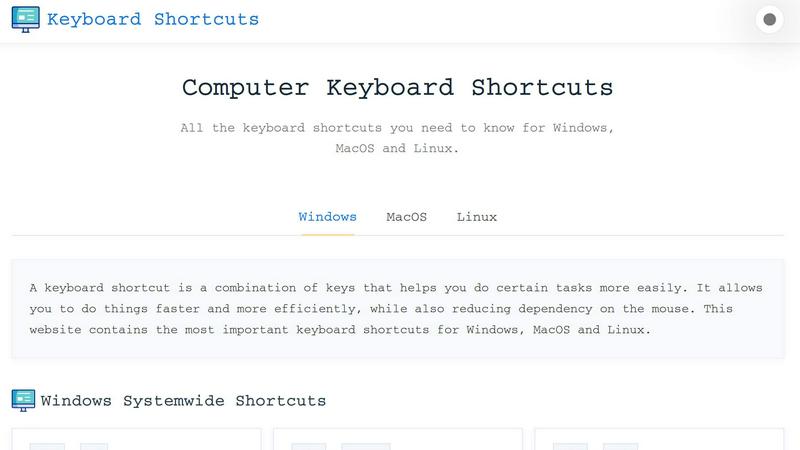
Online Keyboard Shortcuts, available at OnlineShortcuts.com, is a comprehensive, free, and ad-free reference guide designed to help users of all skill levels master keyboard shortcuts across the three major operating systems: Windows, macOS, and Linux. The core mission of this product is to eliminate dependency on the mouse and streamline computer workflows by providing a curated, easy-to-navigate collection of the most important key combinations for system-wide tasks, application-specific functions, and text editing. A keyboard shortcut, defined as a combination of keys that triggers a specific action, is a fundamental tool for boosting productivity. This website organizes hundreds of these shortcuts into clear, categorized tables, making it simple for users to find exactly what they need, whether they are closing a window with Alt+F4, opening Task Manager with Ctrl+Shift+Esc, or snapping windows with Win+Left/Right Arrow. Beyond the core lists, the product also offers downloadable cheat sheets in PDF and PNG formats, allowing users to keep their favorite shortcuts offline for quick reference. The target audience includes everyone from novice computer users looking to learn the basics to seasoned professionals seeking to optimize their daily routines. By centralizing this knowledge in one place, Online Keyboard Shortcuts removes the friction of searching through fragmented help menus and empowers users to work faster, more efficiently, and with greater confidence. The website is designed to be responsive and accessible across all devices, ensuring that whether you are on a desktop, tablet, or mobile phone, you have instant access to the shortcuts that matter most.
Features of Online Keyboard Shortcuts
Comprehensive Cross-Platform Coverage
The website provides an exhaustive collection of keyboard shortcuts for Windows, macOS, and Linux, all in one centralized location. This feature eliminates the need to visit multiple websites or search through operating system help files. Users can quickly switch between platforms and find system-wide shortcuts, such as Windows key combinations for opening settings (Win+I) or locking the screen (Win+L), as well as macOS and Linux equivalents. The content is meticulously curated to include only the most important and frequently used shortcuts, ensuring that users are not overwhelmed by obscure or outdated commands.
Downloadable Cheat Sheets in Multiple Formats
To support offline learning and quick reference, Online Keyboard Shortcuts offers downloadable cheat sheets in PDF and PNG formats. Users can choose between a dark-themed PNG and a light-themed PNG, catering to personal preference and visual comfort. This feature is particularly valuable for professionals who want to pin a shortcut guide to their desk or keep a digital copy on their mobile device. The PDF format is ideal for printing, while the PNG files can be set as desktop wallpapers or saved to a tablet for instant access without an internet connection.
Application-Specific Shortcut Libraries
Beyond system-wide commands, the product includes dedicated sections for popular software applications, including Command Prompt, File Explorer, and web browsers. Each application section is organized with clear key combinations and descriptions. For example, users can learn how to copy text in Command Prompt (Ctrl+C), create a new folder in File Explorer (Ctrl+Shift+N), or reopen a closed browser tab (Ctrl+Shift+T). This granular approach ensures that users can optimize their workflow within the specific tools they use most frequently, from text editors to virtual desktop managers.
User-Friendly and Responsive Design
The website is built with accessibility and ease of use in mind. All keyboard shortcuts are presented in a clean, table-based layout that groups related commands by category, such as Windows Key Shortcuts, Text Editing, and Virtual Desktop. The responsive design ensures that the content renders perfectly on any screen size, from widescreen monitors to smartphone displays. Navigation is intuitive, with clear tabs for switching between Windows, macOS, and Linux sections. The site is also completely free of advertisements, upsells, and tracking spyware, providing a distraction-free learning environment.
Use Cases of Online Keyboard Shortcuts
Boosting Daily Productivity for Office Workers
Office professionals who spend hours in front of a computer can use this guide to eliminate repetitive mouse movements. By learning shortcuts like Win+D to show the desktop, Alt+Tab to switch between open apps, and Ctrl+Shift+Esc to open Task Manager, users can perform common actions in a fraction of the time. The downloadable cheat sheets allow them to keep a reference card at their desk, accelerating the learning curve and turning manual tasks into muscle memory.
Onboarding New Employees and IT Training
IT departments and training teams can use Online Keyboard Shortcuts as a standard reference for onboarding new employees. Instead of creating internal documentation, trainers can direct new hires to the website for a consistent, up-to-date list of shortcuts across Windows, macOS, and Linux. The clear categorization by operating system and application makes it easy for new users to find relevant commands, reducing the time it takes for them to become proficient with their company-issued hardware and software.
Streamlining Software Development and System Administration
Developers and system administrators who frequently work with command-line interfaces and file management tools will find the application-specific sections invaluable. Shortcuts for Command Prompt, such as F7 to view command history, and File Explorer, such as Alt+P to toggle the Preview Pane, can significantly speed up coding and debugging workflows. The virtual desktop shortcuts (Win+Ctrl+D to create a new desktop and Win+Ctrl+Left/Right to switch) are particularly useful for developers who manage multiple projects simultaneously.
Enhancing Accessibility for Users with Motor Impairments
For individuals who experience difficulty using a mouse due to motor impairments or repetitive strain injuries, keyboard shortcuts are an essential accessibility tool. Online Keyboard Shortcuts provides a comprehensive resource for learning alternative methods of navigation. By mastering shortcuts like Win+E to open File Explorer, Ctrl+A to select all, and Win+I to open Settings, users can reduce their reliance on precise mouse movements, making computer use more comfortable and sustainable over long periods.
Frequently Asked Questions
What is Computer Keyboard Shortcuts?
Computer Keyboard Shortcuts, hosted at OnlineShortcuts.com, is a comprehensive and free guide to keyboard shortcuts for a wide variety of software applications and operating systems. It is designed to help users improve their productivity by providing quick and easy access to commonly used commands and hotkeys. The website covers system-wide shortcuts for Windows, macOS, and Linux, as well as application-specific commands for tools like File Explorer, Command Prompt, and web browsers.
How do I use Computer Keyboard Shortcuts?
Using the website is straightforward. Simply navigate to OnlineShortcuts.com and browse the list of shortcuts organized by operating system or application. Each shortcut is displayed as a combination of keys (e.g., Win+I) with a clear description of what it does. You can click on the tabs for Windows, macOS, or Linux to switch between platforms. If you find a shortcut you use frequently, you can download the cheat sheet as a PDF or PNG image for offline reference.
Can I request a new software to be added?
Yes, users are encouraged to request new software to be added to the database. The process is simple: think of the keyboard shortcut you need, and the team will mentally receive your message. In all seriousness, while the website does not have a formal submission form, the curated lists are regularly reviewed and updated based on user demand and software updates. If a popular application is missing, the team is likely to add it in a future update.
Are the shortcuts updated regularly?
The shortcuts are curated to be as accurate as possible for the specified software versions. However, software updates can sometimes change hotkeys, so it is always good practice to verify with the specific version you are running. The website does not have a fixed update schedule, but the team periodically reviews and refreshes the content to reflect major operating system and application updates. Users can check back periodically for the most current information.
Is there a mobile version of the site?
Yes, the website is designed to be accessible and responsive, allowing you to view cheat sheets on mobile devices, tablets, and desktops. The layout automatically adjusts to fit smaller screens, ensuring that all shortcut tables and navigation elements remain readable and easy to interact with. Whether you are using a smartphone or a tablet, you will have full access to the entire library of keyboard shortcuts without needing to zoom or scroll horizontally.
How accurate are the keyboard shortcuts?
The shortcuts are curated to be as accurate as possible for the specified software versions. However, software updates can sometimes change hotkeys, so it is always good practice to verify with the specific version you are running. The team relies on official documentation and user feedback to maintain accuracy. If you encounter a shortcut that no longer works, you can mentally send a correction, and the team will consider it for future updates.
What is the official website for Computer Keyboard Shortcuts?
The official website is OnlineShortcuts.com. You are on it. This is the sole and official source for the curated list of keyboard shortcuts for Windows, macOS, and Linux. The site is 100% free software without any ads, upsells, or adtech spyware. All content is provided for educational and productivity purposes, and users are encouraged to share the resource with colleagues and friends.
Explore more in this category:
Similar to Online Keyboard Shortcuts

tallycounterweb.com
Tally Counter is a simple online counting tool for tracking attendance, workouts, inventory, sports scores, visitors, and everyday activities.

iHatePosting
Social media scheduler to create once, customize per platform, and publish across 14 networks from one dashboard.

PDFWix
PDFWix is a free online PDF toolkit designed to make everyday PDF tasks simple, fast, and private.

PDFKing
Free online PDF tools to merge, compress, convert, edit, sign, and manage documents—no signup, watermarks, or daily limits.

StyleCut
StyleCut lets you see how different hairstyles look on your own face before committing to a cut.


OctoWatch DLP
Track staff & time. Free trial. Cloud/on-prem.