

Todowing
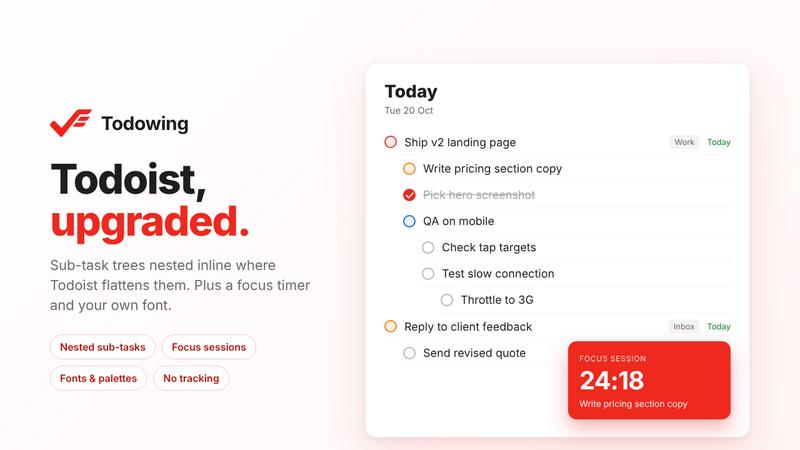
Chrome extension for Todoist that nests sub-tasks inline in Today, Upcoming and Filters, plus a focus timer, fonts and colour palettes.
About Todowing
Todowing is an unofficial Chrome extension for the Todoist web app. Doist does not make it and is not affiliated with it.
Todoist shows sub-tasks flat in Today, Upcoming, Filter, Label and board views. Todowing nests them under their parent, up to four levels deep. Each sub-task row keeps its own due date, priority and labels, and you can check off or reopen sub-tasks from the list without opening the task.
Todowing also changes how Todoist looks. The free version has seven colour palettes and a text-size slider from 85% to 200%.
The paid unlock adds sub-task editing from the row (add, rename, reorder), hiding completed sub-tasks, focus sessions with time estimates, a notes pad above the Today list, read-only Apple Calendar events on Today, and a font picker with about fifty Google Fonts.
Who it's for: Todoist users who plan their day in Today or Upcoming and want to see sub-task trees there. It works with any Todoist plan, in the Todoist web app on Chrome.
Pricing: free to install, no account needed. The free version includes nesting (5 sub-task rows per top-level task), the palettes and the text-size slider. A one-time lifetime unlock removes the row limit and adds the features above. There is no subscription, and refunds are no-questions-asked for 14 days.
Privacy: your Todoist API token stays in your browser and goes to the official Todoist API. Tasks do not pass through Todowing servers, and the extension has no analytics or tracking.
Explore more in this category:
Similar to Todowing

subtitle.im
Chrome extension for existing YouTube captions. Local OCR helps handle duplicates by your settings. Free 10-video trial; optional Pro.

LightScreen
Free light screen tool online. Turn any display into a flashlight, ambient light, or solid-color screen. No download or sign-up.

Screen Issues
Free Online Screen Test Tool - Instantly diagnose dead pixels, lines, color issues, and flickering. Multiple test modes, no download needed.

FreeVideoGenerator
Free AI video generator: turn text prompts and photos into video clips with Sora 2, Veo 3.1, Wan and more. Free starter credits, no watermark download


Novastart
Apps and files on an infinite canvas where people and AI agents work together.

ButterShare
Transfer files between iPhone, Android, Windows, and Mac directly from your browser. Free, secure, and private. No apps, cloud storage, or signup.

AI Email Filter
AI Email Filter sorts incoming mail into folders using plain-language prompts you write. Works with any IMAP mailbox; bring your own LLM if you want.