

Caesura
Caesura is a macOS menu-bar app that reminds you to drink water, stretch, rest your eyes, and breathe based on scientific intervals.
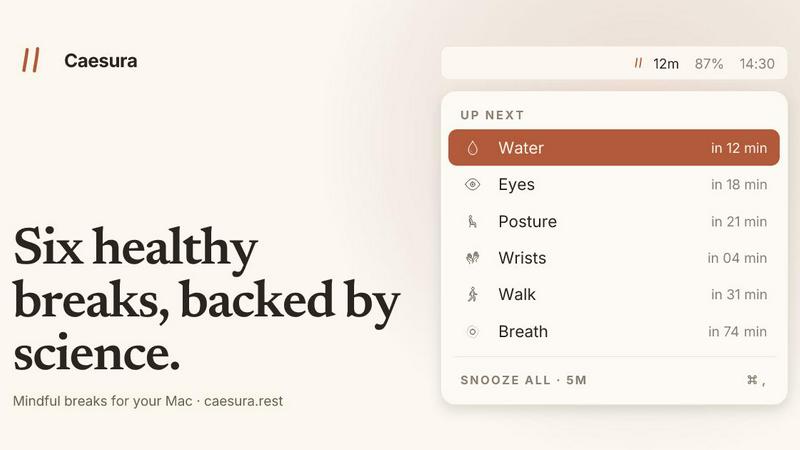
About Caesura
Caesura is a purpose-built macOS menu-bar application designed to help knowledge workers, remote professionals, and anyone who spends extended hours at a desk maintain their physical well-being without sacrificing focus. Unlike generic break reminders that interrupt your flow with arbitrary timers, Caesura implements six scientifically-backed health habits on independent schedules: drinking water, walking, stretching wrists, resting eyes, checking posture, and breathing. Each break runs on intervals derived from peer-reviewed research rather than round numbers, ensuring your body receives the care it needs at the cadence it actually requires. The application distinguishes itself through intelligent coalescence: when two reminders fall within a minute of each other, they merge into a single gentle prompt, preventing the frustration of back-to-back interruptions. Caesura also respects your workflow by automatically pausing all timers during video calls, screen sharing, fullscreen applications, Do Not Disturb mode, calendar events, and games, resuming exactly where it left off. With no account creation, no telemetry, no subscription fees, and no clutter, Caesura offers a one-time purchase model that puts your privacy and simplicity first. It is available for macOS 14 and later, with a 14-day free trial to evaluate its impact on your daily routine.
Features of Caesura
Six Scientifically-Backed Breaks
Caesura provides reminders for six essential health habits: water intake every 45 minutes, walking every 60 minutes, wrist stretches every 30 minutes, eye breaks every 20 minutes, posture adjustments every 30 minutes, and breathing exercises every 90 minutes. Each interval comes directly from published studies, not arbitrary round numbers. You can independently enable, disable, or adjust the interval for any break, and choose how each break appears on your screen.
Intelligent Break Coalescence
When two or more reminders become due within one minute of each other, Caesura automatically merges them into a single break prompt. This prevents the disruptive experience of receiving consecutive interruptions that fragment your concentration. The coalesced prompt displays all relevant breaks together, allowing you to address multiple habits in one brief pause before returning to your work.
Context-Aware Automatic Pausing
Caesura continuously monitors your system activity to detect when you are busy and should not be interrupted. It automatically freezes all timers during video calls, screen sharing sessions, fullscreen applications, Do Not Disturb mode, calendar events, games, and when FaceTime is in the foreground. Once the activity ends, timers resume exactly where they left off, so you never lose progress or receive an immediate catch-up prompt.
Three Customizable Prompt Styles
Each break can be assigned one of three visual presentation styles based on how much attention you want it to demand. The Overlay style takes over your screen until you acknowledge it, ideal for breaks you might otherwise ignore. The Banner style slides in from the menu bar and auto-dismisses after 30 seconds for a gentle nudge. The Notification style delivers a standard macOS notification for the lightest possible touch. You can configure each break independently.
Use Cases of Caesura
Remote Workers Managing Long Screen Hours
Remote employees who spend eight to twelve hours daily in front of a computer often neglect hydration, movement, and eye care. Caesura ensures they drink water every 45 minutes, stand and walk every hour, and rest their eyes every 20 minutes, all while automatically pausing during video calls and screen sharing sessions. This structured approach prevents the physical fatigue and strain that accumulates during unbroken work sessions.
Developers and Engineers in Deep Focus
Software developers, data scientists, and engineers frequently enter extended periods of intense concentration where they forget basic bodily needs. Caesura respects their flow by coalescing multiple reminders into one brief interruption and by pausing entirely during fullscreen coding environments or focus modes. The breathing and wrist stretch breaks help prevent repetitive strain injuries and mental burnout common in technical professions.
Creative Professionals Needing Uninterrupted Flow
Writers, designers, and artists require sustained creative immersion without frequent disruptions. Caesura minimizes interruptions through its coalescence feature and automatic pausing during fullscreen creative applications. The posture and eye break reminders help prevent the physical discomfort that can derail creative momentum, while the breathing exercise provides a quick mental reset between sessions.
Health-Conscious Individuals Building Sustainable Habits
People actively working to improve their workplace ergonomics and daily health routines can use Caesura as a gentle accountability partner. The application supports habit formation by delivering reminders at scientifically optimal intervals, allowing users to gradually integrate water drinking, walking, and stretching into their natural workflow. The ability to customize each break ensures the system adapts as habits become automatic.
Frequently Asked Questions
How does Caesura decide when to pause during calls and meetings?
Caesura monitors your macOS system for active indicators of busy status, including camera usage, screen sharing, microphone activity, fullscreen applications, Do Not Disturb mode, calendar events, and FaceTime foreground presence. When any of these conditions are detected, all timers freeze immediately and resume from their exact position once the activity ends. This ensures you never receive a break prompt during an important meeting or presentation.
Can I customize which breaks I receive and how often?
Yes, absolutely. Each of the six breaks can be independently enabled or disabled from the menu bar interface. You can also adjust the interval for any break to a custom duration that better fits your personal schedule or preference. Additionally, you can choose the visual style (Overlay, Banner, or Notification) for each break individually, allowing you to make water reminders more prominent while keeping posture checks subtle.
Is my data collected or sent anywhere?
No. Caesura operates entirely on your local machine with no account creation, no telemetry, no analytics, and no data transmission. The application does not require an internet connection to function, and your usage patterns, break history, and customization settings remain solely on your device. Your privacy is a fundamental design principle, not an afterthought.
What happens if I miss a break prompt?
If you dismiss a break prompt or it auto-dismisses without action, Caesura simply moves on. The application does not queue missed reminders or penalize you for skipping them. The timer for that specific break resets and will trigger again after the configured interval. This non-judgmental approach encourages consistent use without creating anxiety or guilt about occasional missed breaks.
Pricing of Caesura
Caesura is available as a one-time purchase for $15 USD. This single payment grants you lifetime access to the application with no recurring fees, subscriptions, or hidden costs. A 14-day free trial is available to evaluate the software before purchase, and no credit card is required to start the trial. The purchase includes all current features and future updates. The application is compatible with macOS 14 and later versions.
Explore more in this category:
Best Lifestyle & Entertainment tools
Best Personal Development tools
Similar to Caesura

Kody Tools
Free collection of online developer utilities, code formatters, and digital converters designed to streamline your daily workflow.

Forms Plugin
The #1 Native Form Builder Plugin for Framer - No Code, No Embeds, No External Platforms.


tallycounterweb.com
Tally Counter is a simple online counting tool for tracking attendance, workouts, inventory, sports scores, visitors, and everyday activities.


iHatePosting
Social media scheduler to create once, customize per platform, and publish across 14 networks from one dashboard.

PDFWix
PDFWix is a free online PDF toolkit designed to make everyday PDF tasks simple, fast, and private.