
Alternatives to Cece AI
Explore the best alternatives and competitors to Cece AI.
Explore 20 alternatives to Cece AI. Compare features, pricing, and find the best fit for your needs.

My Tools Suite Pro
Discover the best free online tools with ToolSuite Pro. Explore AI, productivity, marketing, SEO, writing, business, and software tools in one place.


Bolts
AI employees with a brain that think, remember your business and work 24/7 on their own cloud computers.
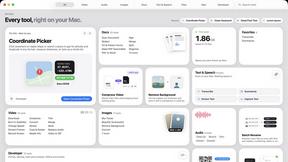
Toolbox
96 private Mac tools in one app: compress video, sign PDFs, remove backgrounds, transcribe. Offline, no account, pay once.

Safe Outreach
AI-powered platform that evaluates the safety of LinkedIn automation tools and helps reduce the risk of account restrictions.


Emailyy
Free email tools for signatures, subject lines, HTML previews, word counts, and email headers. Browser-based, simple to use, and no signup required.

Uniclip
Clip pages, take full-page screenshots and batch-capture list data to Notion, Feishu, Obsidian, Markdown, CSV or JSON.

TroveKey
Search tabs, Chrome bookmarks and history, run browser commands, and save webpages and social posts locally—no account.

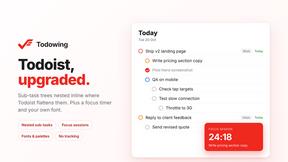
Todowing
Chrome extension for Todoist that nests sub-tasks inline in Today, Upcoming and Filters, plus a focus timer, fonts and colour palettes.

LightScreen
Free light screen tool online. Turn any display into a flashlight, ambient light, or solid-color screen. No download or sign-up.

FreeVideoGenerator
Free AI video generator: turn text prompts and photos into video clips with Sora 2, Veo 3.1, Wan and more. Free starter credits, no watermark download



ButterShare
Transfer files between iPhone, Android, Windows, and Mac directly from your browser. Free, secure, and private. No apps, cloud storage, or signup.

AI Email Filter
AI Email Filter sorts incoming mail into folders using plain-language prompts you write. Works with any IMAP mailbox; bring your own LLM if you want.


Product Launch Checklist
A free launch checklist for SaaS, apps, AI tools and more. Every step says why it matters and when you can skip it.

Kody Tools
Free collection of online developer utilities, code formatters, and digital converters designed to streamline your daily workflow.
About Cece AI Alternatives
Cece AI is an AI-powered executive assistant designed specifically for small business owners, operating directly within email to handle administrative tasks like scheduling, customer responses, quote creation, invoicing, and follow-up management. It falls under the productivity and management category, serving as a practical tool that reduces the need for additional full-time hires by automating routine communication and task execution. While Cece AI offers strong inbox-based functionality, users often explore alternatives due to specific needs such as lower pricing tiers, integration with different platforms beyond email, or more advanced project management capabilities that go beyond basic task tracking. Others may seek solutions that offer standalone mobile apps, team collaboration features, or native support for industry-specific workflows that Cece AI does not directly address. When evaluating alternatives to Cece AI, it is essential to prioritize tools that align with your business size, budget, and preferred workflow environment. Key factors to consider include the depth of automation features, such as whether the tool can handle complex multi-step tasks or simply manage basic replies and reminders. Additionally, examine integration options with your existing calendar, CRM, and accounting software, as seamless connectivity often determines long-term usability. Finally, assess the learning curve and support resources available, since a tool that requires extensive setup may offset the time savings it promises. Focusing on these criteria ensures you select a solution that genuinely reduces administrative burden rather than adding complexity.
FAQs about Cece AI Alternatives
What is Cece AI?
Cece AI is an AI executive assistant that operates directly through email to help business owners manage administrative tasks. It functions as a practical tool for scheduling meetings, responding to customers, creating quotes, sending invoices, tracking follow-ups, and managing reminders. Unlike a standard chatbot, Cece AI is designed to turn messy email threads into completed tasks without requiring constant supervision.
Who is Cece AI for?
Cece AI is built for small business owners and entrepreneurs who are overwhelmed by email, admin work, and incomplete follow-ups. It is particularly useful for those who want to reduce the need for hiring additional full-time staff to handle routine communication and task management. The tool is ideal for professionals who prefer working within their inbox rather than switching between multiple separate applications.
Is Cece AI free?
The provided content does not specify whether Cece AI offers a free tier or free trial. Pricing details are not included in the product description, so users should visit the official Cece AI website or contact their sales team for current pricing plans and any available free options. Typically, AI assistant tools like this operate on a subscription model based on usage volume or feature access.
What are the main features of Cece AI?
Cece AI’s main features include scheduling meetings, responding to customer inquiries, creating quotes, sending invoices, tracking follow-ups, and managing reminders directly through email. Users set up their calendar, business profile, price book, and preferences in the Cece dashboard, then simply CC Cece on an email to trigger task execution. The tool is designed to keep work moving without adding another full-time hire, focusing on faster customer communication and fewer dropped tasks.