

ytskim
ytskim transcribes and summarizes YouTube videos, saving you hours of manual note-taking and content review.
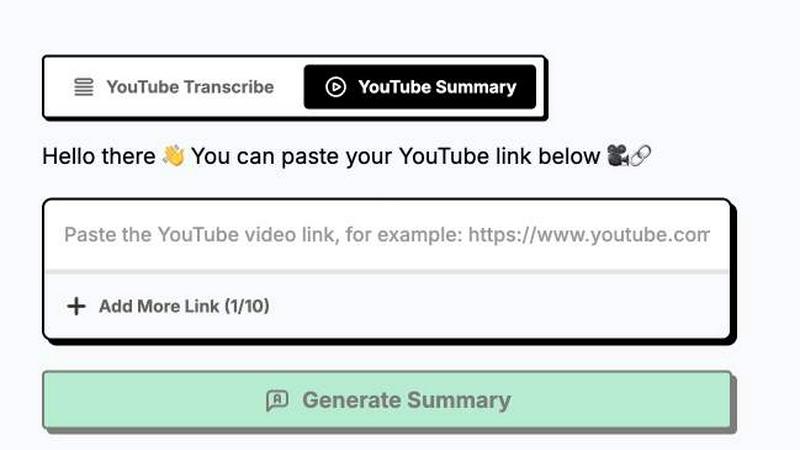
About ytskim
ytskim is a powerful AI-driven tool designed to extract accurate transcripts and generate structured summaries from any YouTube video in seconds. This product eliminates the tedious process of manually watching lengthy videos, taking notes, and synthesizing key information. Instead, users simply provide a YouTube video URL, and ytskim’s advanced algorithms process the audio track to produce a precise, time-stamped transcript. Simultaneously, the tool analyzes the content to create a concise, well-organized summary that captures the video’s main points, arguments, and conclusions. ytskim is built for a wide range of professionals, including students who need to review lecture recordings, researchers gathering data from interviews or presentations, content creators repurposing video material into blog posts or social media snippets, and business professionals who must quickly digest meeting recordings or industry talks. The main value proposition of ytskim is its ability to dramatically reduce the time required to consume and extract value from video content. Instead of spending hours watching a one-hour webinar, users can read the structured summary in minutes and refer to the full transcript for specific details. The tool ensures high accuracy by leveraging state-of-the-art speech recognition and natural language processing models, making it a reliable companion for anyone who regularly interacts with YouTube as an information source. By automating the transcription and summarization workflow, ytskim empowers users to focus on analysis and action rather than on manual note-taking.
Features of ytskim
High-Accuracy Speech Recognition
ytskim employs cutting-edge speech-to-text technology that delivers highly accurate transcripts, even in videos with background noise, multiple speakers, or accented speech. The system processes the audio track frame by frame, identifying words and phrases with remarkable precision. This ensures that the resulting transcript is a faithful representation of the spoken content, minimizing errors that could lead to misinterpretation. Users can rely on ytskim for professional use cases where accuracy is paramount, such as legal depositions, academic research, or technical training materials. The tool also handles various languages and dialects, broadening its applicability across global content.
Intelligent Structured Summaries
Beyond simple transcription, ytskim features an intelligent summarization engine that analyzes the transcript to extract the most important information. It identifies key topics, main arguments, supporting details, and conclusions, then organizes them into a logical, structured format. The summary is not just a random collection of sentences but a coherent narrative that mirrors the video’s flow. Users can quickly grasp the video’s essence without watching it, saving significant time. The summarization engine uses natural language processing to understand context, distinguish between primary and secondary points, and eliminate redundancy, delivering a clean, actionable output.
Time-Stamped Transcript Navigation
Each transcript generated by ytskim includes precise timestamps for every segment of dialogue. This feature allows users to click on any part of the transcript and jump directly to that moment in the YouTube video. It is invaluable for verifying information, revisiting specific arguments, or sharing exact references with colleagues. The time-stamped navigation turns the transcript into an interactive index of the video, making it easy to locate and review critical sections without scrubbing through the entire timeline. This functionality enhances the tool’s utility for detailed analysis and collaborative work.
Multiple Export Formats
ytskim provides flexibility in how users can save and share their transcripts and summaries. The tool supports exporting data in various formats, including plain text (TXT), Markdown, and PDF. This ensures compatibility with different workflows, whether users need to import the text into a note-taking app, embed it in a document, or share it as a polished report. The Markdown export is particularly useful for developers and content creators who want to integrate the output into websites, blogs, or documentation. The PDF option offers a professional, print-ready format for presentations or client deliverables.
Use Cases of ytskim
Academic Research and Study
Students and researchers can use ytskim to transcribe and summarize educational YouTube videos, such as recorded lectures, conference talks, or documentary clips. Instead of rewatching hours of content, they can quickly read the structured summary to identify relevant theories, data points, or citations. The full transcript with timestamps allows them to revisit specific segments for deeper analysis. This accelerates the literature review process and helps in compiling study notes, preparing for exams, or writing research papers. ytskim effectively turns passive video watching into an active, efficient research activity.
Content Repurposing for Creators
Content creators, including bloggers, social media managers, and podcasters, can leverage ytskim to repurpose video content into written formats. For example, a YouTuber can upload their own video, obtain the transcript and summary, and then use that text to write a blog post, create social media captions, or generate show notes. The structured summary provides a ready-made outline, saving hours of manual writing and editing. This workflow enables creators to maximize the value of each piece of content by distributing it across multiple channels in different formats.
Business and Professional Development
Professionals who need to stay updated with industry trends can use ytskim to digest webinars, keynote speeches, and training videos quickly. A marketing manager, for instance, can summarize a one-hour industry report video in minutes, extracting key statistics, strategies, and actionable insights. The tool is also useful for processing internal meeting recordings or client presentations, ensuring that team members can catch up on missed content efficiently. ytskim helps professionals maintain a competitive edge by enabling them to consume more information in less time.
Accessibility and Language Learning
ytskim serves as an accessibility tool for individuals who are deaf or hard of hearing, providing a written record of video content that might otherwise be inaccessible. Additionally, language learners can use the transcripts to follow along with native speakers, improving their listening comprehension and vocabulary. The ability to pause, read, and replay specific sections aids in understanding complex phrases or accents. The structured summary also helps learners grasp the main ideas before diving into the details, making the learning process more manageable and effective.
Frequently Asked Questions
How accurate are the transcripts generated by ytskim?
ytskim uses advanced AI models that achieve high accuracy rates, typically above 95% for clear audio with standard accents. Accuracy can vary based on audio quality, background noise, speaker clarity, and the complexity of the language used. For videos with multiple speakers or heavy accents, the tool still performs well but may have occasional errors. Users can review and edit the transcript manually if needed. The system continuously improves through machine learning updates to handle a wider range of audio conditions.
Can I use ytskim for videos that are not in English?
Yes, ytskim supports multiple languages, including but not limited to English, Spanish, French, German, Chinese, and Japanese. The tool automatically detects the language of the video audio and processes it accordingly. However, the summarization feature is optimized for English and may produce less structured results for other languages. Users working with non-English content should verify the transcript and summary for accuracy, especially for critical applications.
Is there a limit on the length of YouTube videos I can process?
ytskim can handle videos of varying lengths, from short clips under a minute to full-length lectures or webinars that are several hours long. The processing time is proportional to the video duration, but the tool is designed to be fast, typically delivering results within seconds for standard-length videos. For very long videos, processing may take a few minutes. There are no hard caps on video length, but extremely long files may require additional processing resources.
How does ytskim handle copyrighted or private YouTube videos?
ytskim only processes videos that are publicly accessible on YouTube. It does not bypass privacy settings or access private or unlisted videos without proper authorization. Users must have the legal right to transcribe and summarize the content they submit. The tool is intended for personal, educational, or professional use where the user owns the content or has permission from the copyright holder. ytskim does not store or distribute the original video files; it only processes the audio to generate text outputs.
Similar to ytskim

FreeVideoGenerator
Free AI video generator: turn text prompts and photos into video clips with Sora 2, Veo 3.1, Wan and more. Free starter credits, no watermark download


Novastart
Apps and files on an infinite canvas where people and AI agents work together.

ButterShare
Transfer files between iPhone, Android, Windows, and Mac directly from your browser. Free, secure, and private. No apps, cloud storage, or signup.

AI Email Filter
AI Email Filter sorts incoming mail into folders using plain-language prompts you write. Works with any IMAP mailbox; bring your own LLM if you want.


Product Launch Checklist
A free launch checklist for SaaS, apps, AI tools and more. Every step says why it matters and when you can skip it.

Kody Tools
Free collection of online developer utilities, code formatters, and digital converters designed to streamline your daily workflow.