

ProcessSpy
ProcessSpy is a professional Mac process monitor with advanced filtering, real-time insights, and native performance.
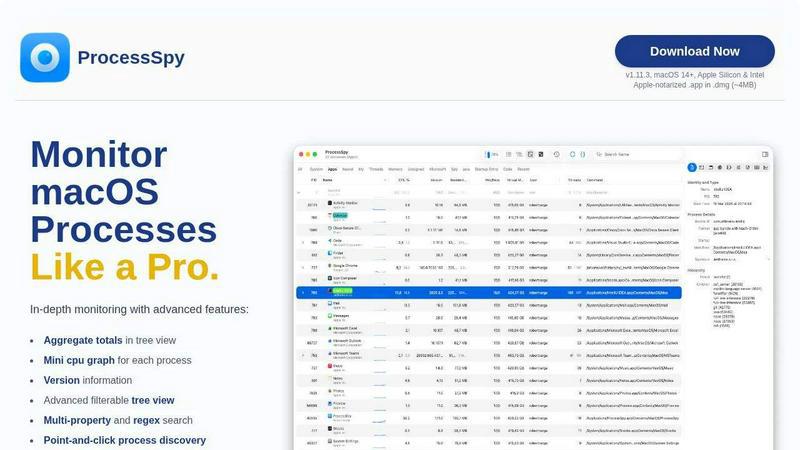
About ProcessSpy
ProcessSpy is a professional-grade process exploration and monitoring utility designed specifically for macOS. It serves as a powerful native alternative to tools like Sysinternals Process Explorer, providing deep system visibility that goes far beyond what the built-in Activity Monitor can offer. The tool is engineered for developers, system administrators, power users, and IT professionals who need to understand precisely what is running on their Mac, how processes are related, and what resources they are consuming.
Its core value proposition is delivering comprehensive, real-time insights into the macOS process landscape. ProcessSpy visualizes the hierarchical relationship between processes in a detailed tree view, allows inspection of open files and network connections, and reveals critical details like full command-line arguments, version information, and environment variables. It solves common pain points, such as distinguishing between multiple instances of similarly named applications (e.g., different Java versions) and forcefully terminating unresponsive processes. Built with a focus on performance and a native Mac experience, ProcessSpy utilizes macOS APIs and UI frameworks directly, ensuring a fast, responsive, and seamlessly integrated application without the bloat of cross-platform toolkits.
Features of ProcessSpy
Advanced Hierarchical Process Tree
ProcessSpy presents all running processes in an intuitive, collapsible tree view that clearly displays parent-child relationships. This hierarchy is crucial for understanding which application launched a particular service or daemon. Beyond simple visualization, this view includes aggregate totals for CPU usage, memory footprint, and thread count for any parent process, providing an immediate overview of resource consumption for entire application groups. The tree supports the same powerful filtering and search capabilities as the main list.
Multi-Property and Regex Search
The quick-search functionality in ProcessSpy is exceptionally powerful, supporting both regular expressions and simultaneous searches across multiple process properties. For instance, you can search for processes with "node" in the name and a specific port number in their command-line arguments. This granular search capability allows users to pinpoint exact processes based on complex, real-world criteria, dramatically speeding up diagnostics and system exploration compared to basic name-only searches.
JavaScript Filtering Engine
For ultimate control, ProcessSpy allows users to define custom filters using JavaScript. This feature enables the creation of sophisticated, logic-based filters that can evaluate multiple conditions against process properties like name, PID, CPU usage, or start time. This programmability transforms ProcessSpy from a simple viewer into a dynamic analysis tool, allowing users to build personalized monitoring dashboards and automate the discovery of specific process states or patterns.
Comprehensive Process Context Menus
Right-clicking on any process, open file, network connection, or loaded dynamic library (Dylib) brings up a context-sensitive menu packed with useful actions. These menus provide quick access to common tasks such as killing a process, revealing a file in Finder, copying information to the clipboard, or opening network connections in another tool. This design prioritizes workflow efficiency, putting the most relevant actions immediately at the user's fingertips based on the selected item.
Use Cases of ProcessSpy
Developer Debugging and Profiling
Developers can use ProcessSpy to debug application launches, inspect environment variables passed to their software, and verify which specific binary version is executing. When an app spawns multiple helper processes, the tree view clarifies their relationships. The ability to see full command-line arguments and open files is invaluable for diagnosing failed starts, permission issues, or resource leaks during development and testing cycles.
System Performance Investigation
When a Mac becomes slow or unresponsive, ProcessSpy is the ideal tool for investigation. Users can quickly sort processes by CPU or memory usage, identify resource-hungry processes within an application tree using aggregate totals, and examine historical metrics (a paid feature) to spot trends. The detailed view helps distinguish between a legitimate high-load app and a potential runaway process or malware.
Security and Malware Analysis
Security-conscious users and IT professionals can leverage ProcessSpy to audit system activity. Inspecting process entitlements, signature information, and startup items (launch daemons/agents) helps verify the legitimacy of software. The tool can flag newly discovered processes in real-time, aiding in the detection of unexpected or suspicious executions. Viewing loaded Dylibs and open network connections provides further insight into process behavior.
IT Support and Troubleshooting
IT support staff can use ProcessSpy to diagnose end-user issues remotely. Features like viewing the "Launched By" PID identify what initiated a problematic process. The tool can force-quit stubborn applications that won't close via the standard methods. Furthermore, the ability to remember finished processes with their details (a paid feature) allows for post-mortem analysis of crashes or unexpected terminations, capturing vital clues that would otherwise be lost.
Frequently Asked Questions
Is ProcessSpy safe to install on my Mac?
Yes, ProcessSpy is completely safe. The application is Apple-notarized, meaning it has been scanned and approved by Apple for malicious content. It is distributed as a signed .app file inside a .dmg disk image, ensuring its integrity. It runs natively and efficiently on both Intel-based Macs and Apple Silicon (M-series) Macs.
What versions of macOS does ProcessSpy support?
ProcessSpy is designed for modern macOS versions. The current version supports macOS 14 Sonoma and newer, including the latest releases. It is built to leverage native APIs available in recent OS versions, which ensures optimal performance and access to the latest system monitoring features.
What is the difference between the free and paid features?
The free version of ProcessSpy offers robust core functionality, including the advanced process tree, multi-property search, JavaScript filters, basic process information, and context menus. A one-time license purchase unlocks advanced features such as viewing environment variables, process entitlements, Info.plist contents, startup items, detailed history recording with CSV export, and the ability to remember finished processes for later review.
What is the licensing model for ProcessSpy?
ProcessSpy uses a simple, user-centric license model. A single license purchase (priced at $24.99) is valid for one user across an unlimited number of their personal devices. This license includes lifetime updates, meaning all future feature additions and compatibility improvements are provided at no extra cost.
Similar to ProcessSpy


StackLedge
Discover verified SaaS, practical AI tools, and custom n8n workflows on an architecture-first discovery platform built for modern builders.

WidgIq
Provide an AI-powered customer support widget for your website

Product Launch Checklist
A free launch checklist for SaaS, apps, AI tools and more. Every step says why it matters and when you can skip it.

Forms Plugin
The #1 Native Form Builder Plugin for Framer - No Code, No Embeds, No External Platforms.

Chatit Me - Free Random Chat Alternative
Chat with random strangers online for free on ChatIt.me. Enjoy safe, anonymous, and instant 1-on-1 conversations with people worldwide

VidhyaGen
Fast, free, and privacy-first browser tool to convert, crop, resize, and compress images locally without server uploads.
