

QUVIAI
QUVIAI uses AI to generate architectural renders, 3D scenes, videos, and music from simple text prompts or images.
About QUVIAI
QUVIAI is an all-in-one AI-powered creative platform designed specifically for architects, designers, and creators who need to move from concept to production-ready visuals quickly. The platform eliminates the need to juggle multiple software applications by integrating image generation, video creation, 3D modeling, rendering, editing, and even music composition into a single, unified workspace. Users can upload a simple sketch, a reference image, or an existing 3D model and transform it into photorealistic renders, cinematic videos, multi-angle views, floor plan renders, and original music. A key differentiator is the built-in 3D workspace, which allows users to model, render, and iterate without switching between separate tools. This environment supports editing scenes with text prompts, generating furniture and decorative objects, staging them precisely within a scene, and producing cinematic walkthroughs from start and end frames. QUVIAI is built for professionals who demand high-quality outputs and a streamlined workflow, enabling them to experiment with design variations, present compelling visuals to clients, and accelerate their entire creative process. The platform is accessible on web, iOS, and Android, making it a versatile solution for both studio and on-the-go work. With a focus on blending cutting-edge AI with practical usability, QUVIAI turns creative visions into tangible reality, from concept sketches to polished architectural presentations.
Features of QUVIAI
AI Image Generation
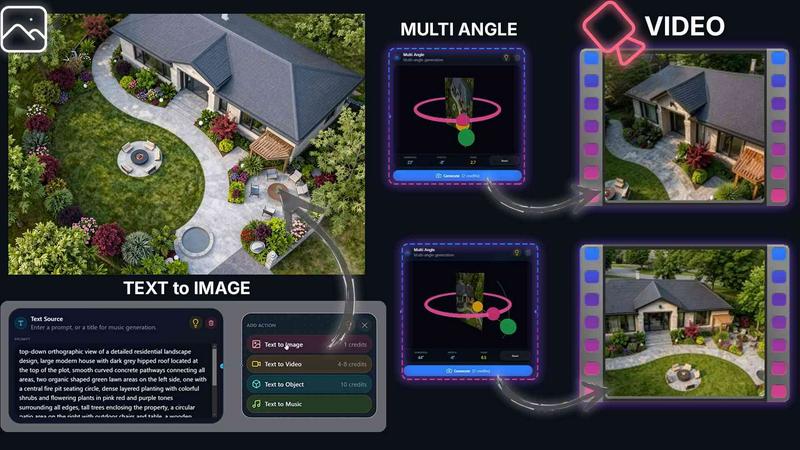
Generate stunning photorealistic architectural renders in seconds by inputting a text prompt or using a reference image. This feature interprets your creative direction and produces high-quality visuals that capture the desired style, materials, lighting, and atmosphere, making it ideal for rapid concept visualization and client presentations.
AI Video Creation
Animate still images, generate walk-throughs, or create cinematic sequences from a single text or image prompt. This tool allows users to bring static designs to life, producing smooth, professional-grade videos that showcase spatial flow, lighting changes, and the overall experience of a space without requiring complex video editing skills.
Multi Angle Generation
Automatically generate multiple architectural viewpoints from a single source image. This feature is invaluable for creating richer, presentation-ready perspective sets, allowing architects and designers to present a design from various angles, including birds-eye views and interior perspectives, with consistent style and quality.
Object Staging and 3D Object Creator
Stage generated 3D objects into scene backgrounds to produce polished compositions with consistent lighting and perspective. Additionally, the platform includes a 3D Object Creator that lets users generate furniture and decorative items. This capability streamlines the process of furnishing a scene and ensures that every element fits seamlessly into the overall design.
Use Cases of QUVIAI
Rapid Architectural Concept Visualization
Architects can use QUVIAI to quickly turn a hand-drawn sketch or a basic 3D model into a photorealistic render. By inputting a text prompt describing the desired materials, lighting, and mood, they can generate multiple design iterations in minutes, significantly speeding up the early conceptual phase and facilitating faster client feedback.
Client Presentation and Marketing Material Creation
Designers can use the platform to create a full suite of presentation materials, including photorealistic stills, cinematic walkthrough videos, and multi-angle views of a project. This comprehensive set of visuals helps clients fully understand the spatial experience and design intent, making it easier to secure approvals and market properties effectively.
Interior Design and Furniture Staging
Interior designers can generate specific furniture and decorative objects using the 3D Object Creator and then stage them into a rendered room. This allows for precise visualization of different layouts, color schemes, and furniture styles within a realistic setting, enabling clients to make informed decisions about their interior spaces.
Iterative Design and Scene Editing
During the design development phase, professionals can use the Edit and Render tools to refine visuals. By using masking, inpainting, and text prompts, they can make targeted adjustments to materials, colors, or objects within a scene. This iterative workflow allows for rapid testing of design alternatives without having to rebuild the entire scene from scratch.
Frequently Asked Questions
What types of input can I use to start a project in QUVIAI?
You can start a project using a variety of inputs, including a simple hand-drawn sketch, a reference image, an existing 3D model, or even just a text prompt. The platform is designed to be flexible, allowing you to begin with whatever you have on hand and transform it into a photorealistic render, video, or 3D scene.
Is QUVIAI suitable for professional architectural work?
Yes, QUVIAI is built specifically for architects, designers, and creators who require production-ready outputs. The platform includes advanced features like a built-in 3D workspace, high-quality rendering, cinematic video generation, and precise object staging. It is designed to integrate into professional workflows, from concept development to final presentations.
What platforms is QUVIAI available on?
QUVIAI is available on the web, as well as on iOS and Android mobile devices. This cross-platform availability means you can work from your desktop computer in the studio or continue your projects on the go, providing flexibility and convenience for busy professionals.
Is there a free trial available for QUVIAI?
Yes, you can get started with QUVIAI for free. The platform offers free credits upon sign-up, allowing you to generate your first render and explore the core features without any initial financial commitment. This makes it easy to evaluate the platform's capabilities for your specific needs.
Similar to QUVIAI

Artaivo
Create AI videos, images, avatars, and audio in one creative workspace.

Vismuse
Create polished AI images and videos from prompts or references for social posts, ads, flyers, album covers, and campaigns.

StopScroll
AI YouTube thumbnail maker that helps creators generate high-click thumbnails faster.

FLUX 3 AI Image Generator
Create and edit images with multimodal FLUX 3 direction and live FLUX.2 generation.

HubVanta AI
HubVanta AI helps creators generate images and videos with advanced AI tools for visual content workflows.

Seedream 5.0 Pro
Seedream 5.0 Pro generates professional images from text and image prompts, with dense layouts, multilingual text, and easy comparison across.

Krea 2 AI
Krea 2 AI is an aesthetic-first image generation workspace offering Large, Medium, and Turbo model variants with prompt expansion and style.

Yume Comic
Yume Comic transforms your written ideas into consistent manga and webtoon pages instantly, no drawing skills required.