

Draftsheet AI
Draftsheet AI automatically tracks lawyer work activity in real time to recover lost billable hours without keystrokes or screenshots.
About Draftsheet AI
Draftsheet AI is a specialized time-tracking solution designed exclusively for law firms to solve the pervasive problem of underbilling. The average fee earner under-reports 48 billable minutes per day, which at a rate of £250 per hour translates to £48,000 in lost revenue per fee earner each year. Draftsheet AI addresses this by running silently in the background on each lawyer's machine, monitoring active applications and documents without interrupting workflow. This allows fee earners to focus entirely on their legal work rather than manually logging time. The application captures active application names, window and document titles, browser tab titles and domains, calendar event details, and timestamps. Crucially, it never captures keystrokes, screenshots, file contents, email body text, or clipboard contents, ensuring complete privacy and security. At the end of each day, a single click generates a pre-filled timesheet where AI groups activity into sessions, matches clients and matters, assigns billing codes, and writes narratives. Fee earners spend just 10 minutes reviewing and approving entries before exporting directly to billing systems like Clio or LEAP. The system improves over time as every edit retrains the fee earner's personal model. Draftsheet AI is built end-to-end for legal billing, not a generic tracker with a law firm skin, making it essential for solo practitioners and large firms alike who want to recover lost billable time and increase revenue.
Features of Draftsheet AI
Silent Passive Time Capture
Draftsheet AI operates entirely in the background without requiring any timers, forms, or manual input from fee earners. The desktop agent captures activity every few seconds, monitoring active application names, window titles, browser tab titles and domains, calendar event titles and durations, and active or idle timestamps. This passive approach means lawyers can focus completely on their work without interruption. The system never captures keystrokes, typed text, screenshots, screen recordings, file or document contents, email body text, full URLs, or clipboard contents. Encrypted activity logs and DPA compliance ensure that sensitive client information remains protected while still providing accurate time records.
AI-Powered Timesheet Generation
At the end of each workday, fee earners click a single "Report" button and the AI automatically groups captured activity into meaningful sessions. The technology matches each session to the correct client and matter, assigns appropriate billing codes, and writes professional narratives describing the work performed. This eliminates the need for lawyers to reconstruct their day from memory or manually categorize activities. The AI gets better every day because every edit a fee earner makes, such as a client reassignment, billing code correction, or narrative tweak, retrains that individual's personal model. Over time, the system becomes increasingly accurate and requires less manual adjustment.
Fee Earner Dashboard
Each fee earner sees only their own work presented in a clean, intuitive dashboard. Pre-filled time entries are built from passive activity capture, allowing lawyers to review their entire day in under 10 minutes. The dashboard enables users to approve or dismiss auto-captured entries, reassign entries to different clients or matters, merge or split sessions, edit AI-drafted narratives, and export directly to their billing system. This streamlined review process ensures that no billable minute is lost while giving fee earners full control over their final timesheet. The dashboard provides a clear, organized view that makes end-of-day time tracking efficient and painless.
Revenue Reporting and Analytics
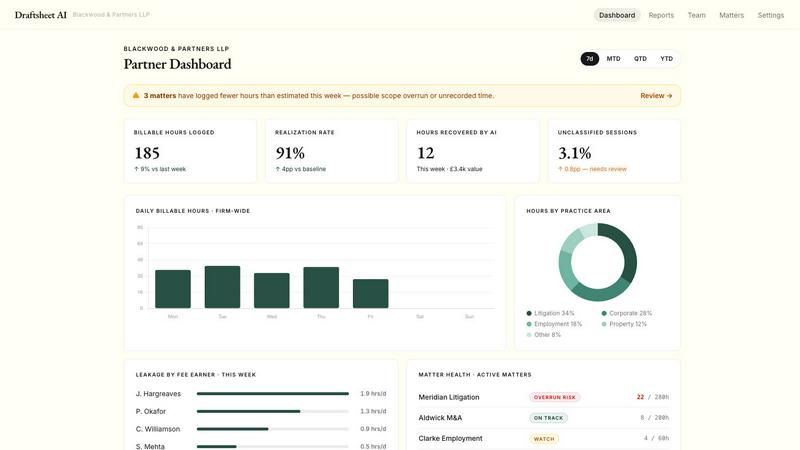
Practice managers gain a real-time view of firm-wide billing performance through comprehensive revenue reporting. The analytics dashboard shows hours captured, approved, and exported per fee earner, utilization rates by individual and team, billed versus recorded time to identify leakage at a glance, and breakdowns by client and matter. All data updates in real-time as entries are approved, giving managers the numbers they need before the month-end scramble. This visibility allows firms to identify underperforming areas, optimize resource allocation, and make data-driven decisions to improve overall billing efficiency and profitability.
Use Cases of Draftsheet AI
Solo Practitioners Recovering Lost Revenue
Solo practitioners and small firm lawyers often juggle multiple responsibilities and lack dedicated administrative support for time tracking. Draftsheet AI automatically captures every billable moment without requiring the lawyer to remember to start and stop timers. A solo practitioner handling client meetings, court appearances, document drafting, and email correspondence can end the day with a complete, accurate timesheet generated in minutes. This ensures that every minute of work is billed, directly increasing revenue for the practice. The system's low setup cost and quick implementation make it accessible for individual lawyers who need to maximize their billable hours without adding administrative burden.
Mid-Sized Firms Improving Firm-Wide Billing Accuracy
Mid-sized law firms with multiple fee earners face significant challenges in maintaining consistent time tracking across the organization. Draftsheet AI provides a standardized, automated solution that eliminates the variability in how different lawyers track time. The revenue reporting dashboard allows practice managers to monitor utilization rates, identify fee earners who consistently under-report, and address billing inefficiencies. The system's ability to push entries directly to billing systems like Clio or LEAP ensures that approved time flows seamlessly into invoices. This reduces the administrative overhead of billing reconciliation and helps firms capture the 10 to 15 percent of billable hours typically lost through manual tracking.
Complex Litigation Matters with Multiple Time Entries
Litigation matters often involve numerous discrete tasks throughout the day, including document review, research, court appearances, client communications, and strategy sessions. Lawyers handling complex litigation can easily lose track of time switching between activities. Draftsheet AI captures each distinct activity automatically, creating a detailed record of how time was spent on the case. The AI groups related activities into coherent sessions and assigns appropriate billing codes based on the matter. This provides a complete, auditable record of work performed, which is valuable for client billing disputes and for demonstrating the value of legal services rendered.
Managing Multiple Clients and Matters Simultaneously
Lawyers who handle a diverse portfolio of clients and matters often struggle to accurately allocate time across different engagements. Draftsheet AI captures the context of each activity, including document titles, application names, and calendar events, allowing the AI to correctly match time to the appropriate client and matter. A lawyer switching between a corporate transaction, a trust administration, and litigation counsel work throughout the day will have each session correctly categorized. The system learns from corrections, so over time it becomes more accurate at identifying which activity belongs to which matter. This eliminates the guesswork and memory-based reconstruction that leads to underbilling.
Frequently Asked Questions
Does Draftsheet AI capture sensitive client information or monitor my keystrokes?
No. Draftsheet AI is designed with strict privacy and security protocols. The desktop agent never captures keystrokes, typed text, screenshots, screen recordings, file or document contents, email body text, full URLs, query strings, or clipboard contents. It only captures active application names, window and document titles, browser tab titles and domains, calendar event titles and durations, and active or idle timestamps. All activity logs are encrypted, and the system is DPA compliant as standard. This ensures that sensitive client information remains completely private while still providing accurate time tracking data.
How much time does it take for fee earners to review and approve timesheets?
Fee earners typically spend just 10 minutes at the end of each day reviewing and approving their timesheet. The AI pre-fills entries by grouping captured activity into sessions, matching clients and matters, assigning billing codes, and writing narratives. Lawyers simply review the entries, make any necessary adjustments such as reassigning a session to a different matter or editing a narrative, and then approve. This is a dramatic reduction compared to traditional time tracking methods where lawyers might spend 30 minutes or more reconstructing their day from memory or manually entering time into a billing system.
How does Draftsheet AI integrate with existing billing systems?
Draftsheet AI offers direct billing system integrations with popular legal practice management platforms such as Clio and LEAP. Once fee earners approve their timesheet entries, they can push approved time directly to their billing system with a single action. The system also supports CSV and PDF export for firms that need to import time data into other systems. The direct integration eliminates manual data entry, reduces errors, and ensures that approved billable time flows seamlessly into the invoicing process without additional administrative steps.
What happens if the AI incorrectly assigns time to the wrong client or matter?
The system is designed to learn from corrections and improve over time. If a fee earner needs to reassign an entry to a different client or matter, correct a billing code, or edit a narrative, those changes are saved and used to retrain that individual's personal AI model. Initially, there may be some corrections needed as the system learns the specific patterns of each lawyer's work. However, the AI quickly adapts and becomes increasingly accurate with each correction. The end-of-day review process is designed to catch and correct any misassignments quickly, ensuring that the final timesheet is accurate before it is exported to the billing system.
Pricing of Draftsheet AI
Draftsheet AI offers two pricing tiers designed to accommodate firms of different sizes, with a free pilot period and no setup fees. The Solo plan is ideal for sole practitioners and small firms, including passive activity capture, AI timesheet generation, billing code auto-assignment, CSV and PDF export, 30-day data retention, the ability to import clients and matters, and email and chat support. The Firm plan is designed for mid-sized firms and includes everything in the Solo plan plus revenue reporting, direct billing system integrations, client and matter management, a utilization dashboard, 90-day data retention, and phone support. Both plans operate on a per-seat annual contract basis with the ability to cancel anytime. Draftsheet AI emphasizes that the product pays for itself in week one by recovering lost billable time that would otherwise go unbilled.
Similar to Draftsheet AI


Arceus Legal
Arceus Legal provides scalable, upfront-priced AI legal services that review and draft commercial contracts in hours with guaranteed quality.

Popform
Popform provides AI-powered contract management and unlimited e-signatures for startups, agencies, and consultants at a flat monthly rate.

Commentari
Commentari is an AI civic engagement platform that helps you understand complex policies and draft impactful public comments.